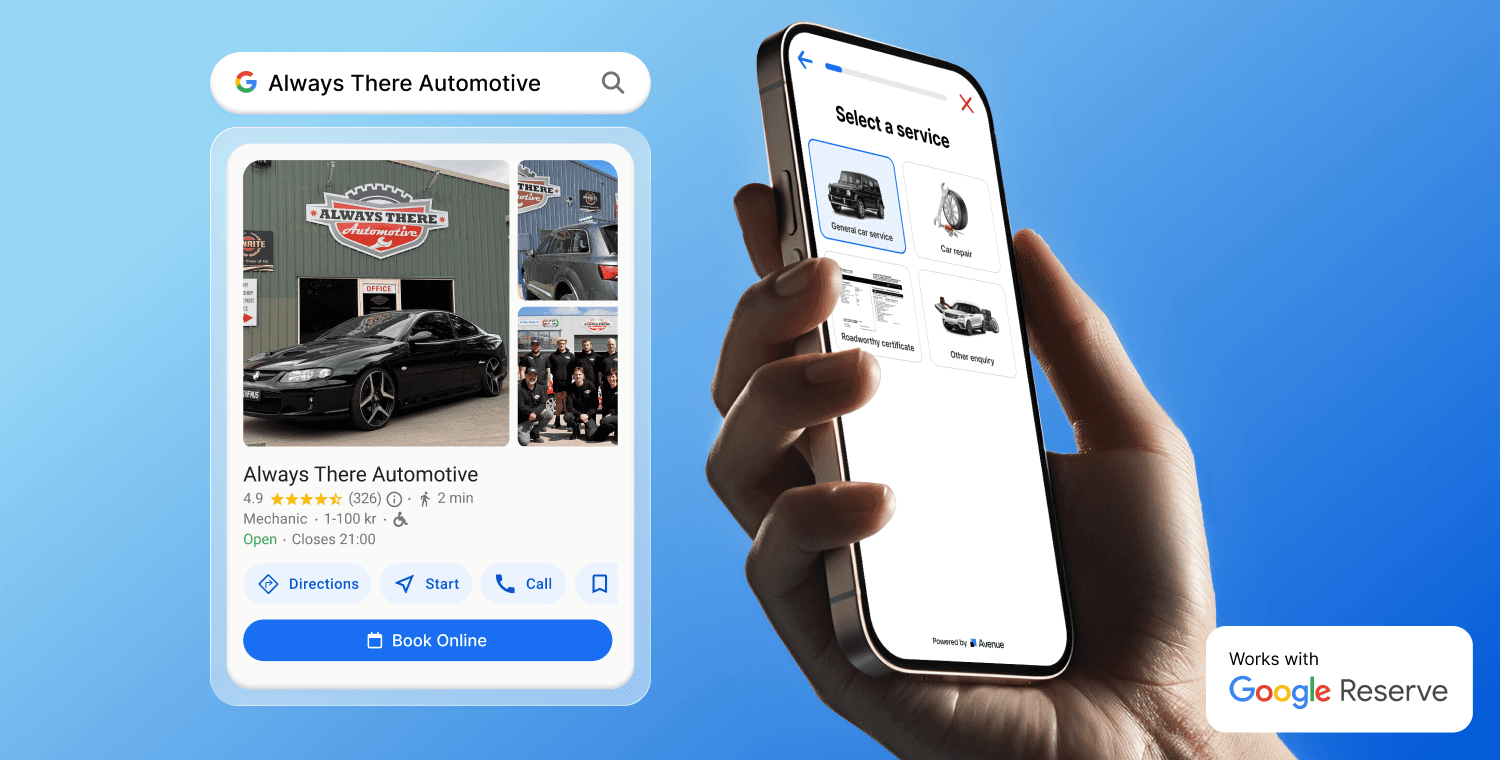
When someone needs a mechanic, an electrician, a plumber or a cleaner, they search Google. They find your listing, read your reviews, check your hours. Then, on most listings, the only thing they can do is call. If you are with a customer, under a car or up a ladder, that call goes to voicemail, and they try the next business on the list.
Google has a fix for this that a lot of businesses never hear about: booking, straight from your listing. Here is how it works, the two ways to set it up, and what to look for in a booking tool.
Your Google listing is where customers find you
For most local service businesses, the Google Business Profile does a lot of the work. It shows your name, your hours, your phone number, your photos and your reviews, on Google Search and on Google Maps. It is free, and it is often the first thing a new customer sees.
What it can't do on its own is take a booking. Without one, every customer who finds you has to pick up the phone, and your listing is only as good as your ability to answer it.
What the Book Online button does
The button sits on your listing next to Call and Directions. A customer taps it and your booking form opens. They pick the service they need and a time that suits them, answer a few questions, and book. The booking comes straight to you.
- They find your Google listingOn Google Search or Google Maps, with your reviews and hours.
- They tap Book onlineInstead of calling, right there on your listing.
- They book on your formThe service they need, a time that suits them, and the answers to your questions.
- The booking reaches youBy email or SMS, and in your Avenue dashboard.
What your customer sees
When a customer taps Book online, your booking form opens with your services, your questions and your available times. Try it on a real listing below.







A good form asks what you need to know before you show up, like the rego, the make and model, or what the problem is, so you know what you are walking into.
A phone call versus a tap
Here is the same customer trying to book you, two ways.
- Missed call10:42 am, you were on a job
- Voicemail, 0:23"Hi, my brakes are making a noise..."
- You call back6:15 pm, no answer
- Text: Does Thursday work?Reply the next morning
- Into the notebookThu 9am, brakes, Sam, number?
- Oct15Thursday, 15th October9:00 AM
- Sam Taylor04xx xxx xxx
- Brake inspectionSqueaking when braking
With the button, there is no phone tag and nothing to write down. The customer has already told you what they need and when, and you can get on with the job in front of you.
Customers book when you can't answer
Across the businesses on Avenue, over about three months, a median of 41% of bookings were made outside 8am to 5pm. That is evenings, weekends and early mornings, the times a small business owner is least likely to pick up the phone.
A phone number only works when someone answers it. A booking button works whenever your customer is ready, and the booking is waiting for you when you check your phone.
Two ways to add booking to your Google listing
Option 1: add your own booking link. If you already use a booking tool that gives you a booking page, you can add it yourself. Open your Business Profile on Google Search or Maps, choose Edit profile, find Booking links, and paste your booking page's address. Google does not charge for this. A link you add yourself usually shows on your listing as a booking link, not as the blue Book online button.
Option 2: let a booking provider connect it. Some booking tools connect to your Google listing for you. You set up your services and availability in the tool, and it handles the Google side. This is the way to get Google's own blue Book online button next to Call and Directions.
| Your own link | Through a provider | |
|---|---|---|
| Cost from Google | Free | Free |
| What you need | A verified Business Profile and a booking page | A verified Business Profile and an account with the provider |
| Who sets it up | You | The provider |
| How it shows on your listing | Usually a booking link | Google's blue Book online button |
| Where bookings go | Wherever your booking tool sends them | Into the provider's system |
Either way, the button is only as good as the booking tool behind it.
What to look for in a booking tool
- It works on a phone. Most people who find you on Google are on their phone.
- It asks your questions. The job details you need, so you are not ringing back to ask.
- It matches how you work. Instant bookings at real available times, or booking requests you check first.
- It tells you straight away. Each booking by text or email, not only in an app you have to open.
- It reminds the customer. Fewer no-shows without you chasing anyone.
- It works without a website. If your Google listing is your website, the form has to live somewhere on its own.
If the tool you already use does all of this, option 1 might be all you need.
No website? You can still take bookings
Plenty of small businesses run on their Google listing and word of mouth, without a website. Booking from Google doesn't need one.
What you need. A verified Google Business Profile and a booking form that has its own address, so the button has something to open.
What you miss without a website. A place for the longer story: photos of past jobs, detailed service pages, and more pages for Google to show in search. Your listing covers the basics, not all of that.
What to do later. If you build a website, put the same booking form on it. Bookings from Google and from your site then land in one place.
The businesses we set up without a website get more bookings through the button than they used to take over the phone.
Where Avenue fits
Avenue is option 2. If your listing has no Book online button today, it gets Google's own blue button once you sign up, and we do the setup for you.
- We build your booking form. Your services, your questions and your availability. See what the booking form can do.
- We connect it to your Google Business Profile. All you need is a verified listing. You don't touch your Google settings.
- The button is live within 24 hours of signing up. From then on, every booking from your Google listing reaches you by email or SMS and lands in your Avenue account.
Once a booking is confirmed, Avenue sends your customer a text and an email 24 hours before the appointment and again 1 hour before. About 5 days after the job, it asks them for a Google review on your behalf, and those reviews show up on the same listing the next customer finds.
If you run a workshop on MechanicDesk, each booking goes straight into MechanicDesk too. And for the customers who still call, Avenue's AI Call Agent answers the calls you miss and texts them your booking link.
The Book Online button is part of every Avenue plan, starting with Standard at $199 a month and no lock-in contract. See pricing, or how Avenue works for mechanics and electricians.